Guides · Updated October 20, 2026
YOLO vs. COCO annotation format: fields, conversion and pitfalls
YOLO and COCO store the same objects in opposite ways: YOLO writes one text file per image, one line per object, with class ids from 0, coordinates divided by the image size and boxes given by their center; COCO keeps a whole split in one JSON file, with pixel coordinates, boxes given by their top-left corner and category ids that are whatever the file declares. Nearly every conversion bug comes from the ids, the normalization or the box origin, and most of these bugs pass without an error message.
The YOLO txt format
Each image has a label file with the same stem and the extension .txt, one object per line, values separated by spaces. Coordinates are divided by the image width (x) or height (y), so they lie between 0 and 1. An empty or missing label file means background.
- Detection: class cx cy w h, for example 0 0.312500 0.416667 0.312500 0.333333.
- Segmentation: class x1 y1 x2 y2 … xn yn, at least three points, one outline per line, closed implicitly.
- Pose: class cx cy w h, then x y v per keypoint (or x y only). The visibility v follows COCO: 0 not labeled, 1 labeled but occluded, 2 visible.
A line does not name its task; its length does. Four values after the class are a box (a fifth is usually a confidence score from predictions), an even count of six or more is a polygon, and 4 + 3 × N values are a pose only because data.yaml declares kpt_shape: [N, 3]. Without it, a pose line with 17 two-value keypoints is a valid 19-point polygon, which is why the Annotation Studio reads pose lines only when kpt_shape is declared.
data.yaml holds names (0: person, 1: car), optionally nc, which must match the number of names, and the train, val and test image folders, relative to path or, without path, to the yaml file. Pose datasets add kpt_shape and flip_idx, the keypoint order after a horizontal flip. The trainer finds a label by replacing the last /images/ in the image path with /labels/ and the extension with .txt, so images/train/a.jpg pairs with labels/train/a.txt. A label file anywhere else is never read.
The COCO JSON format
A COCO file holds three lists linked by ids; each split is a separate file, such as instances_train2017.json and instances_val2017.json.
| Field | Meaning |
|---|---|
| images: id, file_name, width, height | file_name is relative to an image folder set in the loader; width and height are the pixel size all coordinates refer to. |
| annotations: image_id, category_id | Image and category of the object. |
| bbox | [x, y, width, height] in pixels, x and y at the top-left corner of the box. |
| segmentation | Polygons [[x1, y1, x2, y2, …], …] in pixels, or RLE {"size": [h, w], "counts": …}. |
| area | Pixel area of the mask, not the box. COCO evaluation sorts objects into small (below 32 × 32), medium and large (above 96 × 96) by it. |
| iscrowd | 0 for one object (polygons), 1 for a crowd region (RLE). Detections on a crowd are ignored instead of counting as false positives. |
| keypoints, num_keypoints | x, y, v triplets in pixels and the number of labeled points. |
| categories: id, name | Ids are arbitrary integers. Pose categories add keypoints (names in order) and skeleton (1-based index pairs). |
One annotation may carry several polygons, for example for an object cut in two by an occluder. RLE counts run down the columns (column-major order) and start with a run of background pixels.
One box converted by hand
Take an image of 640 × 480 pixels with the COCO box [100, 120, 200, 160] of category id 1, the first of the ids 1, 2 and 3.
- Corner to center: cx = 100 + 200 / 2 = 200, cy = 120 + 160 / 2 = 200.
- Normalize: cx = 200 / 640 = 0.3125, cy = 200 / 480 = 0.416667, w = 200 / 640 = 0.3125, h = 160 / 480 = 0.333333.
- Map the id by position: the first category becomes class 0.
- Write the line: 0 0.312500 0.416667 0.312500 0.333333.
Back to COCO: x = (0.3125 − 0.15625) × 640 = 100, y = (0.416667 − 0.1666665) × 480 = 120.0002, w = 200, h = 0.333333 × 480 = 159.9998. Six decimals keep the error below 0.01 px even at 4,000 px, so rounding is not the problem; skipped steps are. Without step 1, every box is shifted by half its width and height. Without step 2, every value is far above 1. With category_id − 1 instead of the position, the 80 categories of COCO 2017, whose ids run from 1 to 90 with gaps, get class ids up to 89.
Conversion pitfalls and how to spot them
- Box origin. Mixing up corner and center shifts every box by half its size. Boxes near the edges then stick out of the image; the others only show when you look at the images.
- Normalization. Pixel values left in a YOLO file, or division by the wrong size, such as swapped width and height in an EXIF-rotated phone photo. The Ultralytics loader treats values above 1 as a corrupt label and skips the image, with only a warning in the log.
- Category ids. COCO ids can start at 1, have gaps or come in any order; YOLO ids are positions in names. Map through the category list sorted by id and never just subtract 1. A class id beyond the names also makes the loader skip the image.
- Holes and parts. YOLO allows one outline per line and COCO fills the union of the polygons of an annotation, so neither can cut a hole; a donut needs COCO RLE. A multi-part COCO object becomes either several YOLO lines, which raises the instance count, or one polygon whose parts are joined by thin bridges.
- Crowd regions. YOLO has no iscrowd flag. A crowd written as one object teaches the model that 40 people are one person, so the usual choice is to leave crowds out, and YOLO training then sees them as background.
- File names. A COCO file_name may contain subfolders (train/0001.jpg) or only a base name. A converter that flattens paths lets two 0001.jpg files from different folders collide, and a.jpg and a.png in one folder would both need a.txt.
- Splits. YOLO splits are folders in data.yaml, COCO splits are separate files. Convert all splits in one run with one class list, or the ids may differ between splits.
Which format to use
Use the format your training code reads natively and convert at the boundary; maintaining both by hand guarantees drift.
- YOLO for training with Ultralytics, for boxes and simple outlines, and for labels you want to diff as text: one small file per image suits version control.
- COCO for crowd regions, RLE masks and objects with holes, for box, mask and keypoints kept in one record, and for COCO metrics (AP over IoU 0.50 to 0.95, by object size).
- COCO as the master copy whenever it holds something YOLO cannot express: YOLO to COCO keeps boxes, polygons and keypoints, COCO to YOLO drops crowds and holes, and the polygons of a pose dataset (they become boxes).
One loss runs the other way: a converted YOLO box has no mask, so its COCO area is the box area, larger than the object, which moves some objects into a bigger size bucket of the COCO metrics.
Converting and checking a dataset with this site
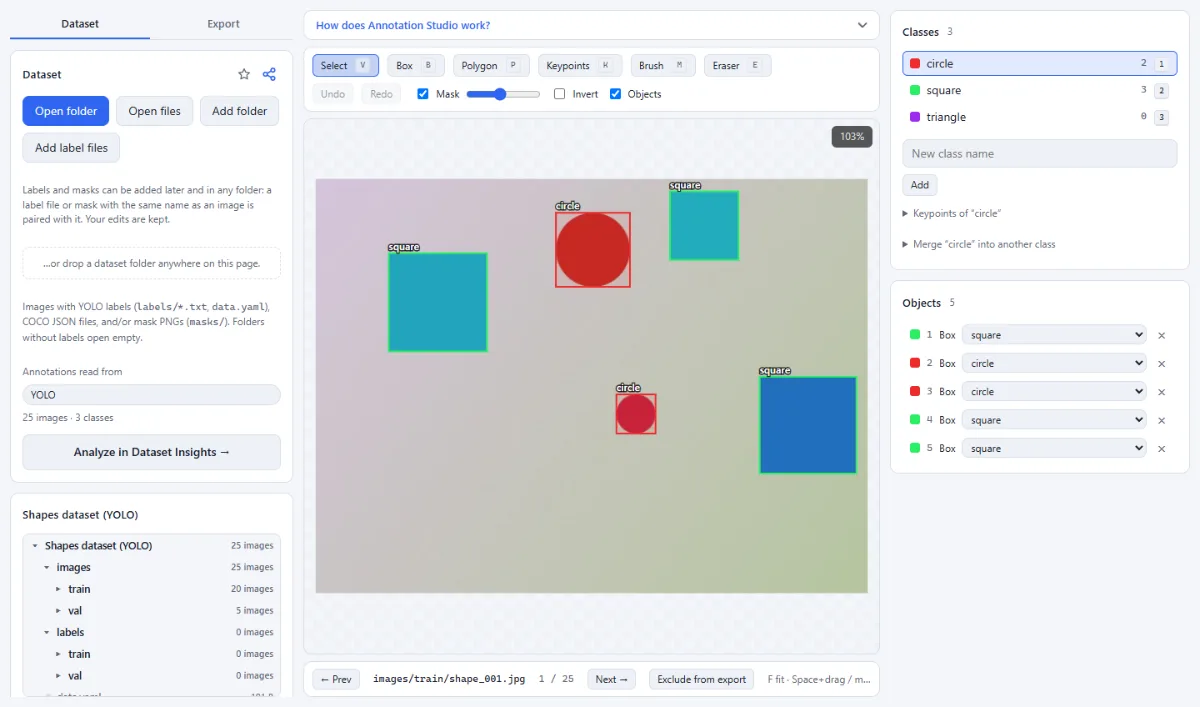
- Open the dataset folder in the Annotation Studio; nothing is uploaded. "Annotations read from" shows the detected format, image and class counts, and warnings such as a missing data.yaml; with both formats present, you switch the source there.
- Look at a few images. A shift by half a box, or all boxes squeezed into the top-left corner, is obvious.
- In the "Export" tab choose "YOLO" or "COCO" and a "Target" ("Choose output folder" or "ZIP download"), then click "Export … images as YOLO" (or COCO).
- Click "Analyze in Dataset Insights →" or open the export in Dataset Insights.
What the export does: COCO categories are sorted by id and become YOLO classes 0, 1, 2. Toward COCO, the original ids are kept if they are unique, otherwise (and for YOLO sources) they run from 1 to N. file_name is relative to images/ and includes the split folder (train/a.jpg). Images without objects are listed too, so background images survive. RLE regions are written as grayscale PNGs in masks/, not as YOLO lines, and multi-part polygons become one line per part. data.yaml has no path key, so its folders resolve relative to the yaml file; without a val split, val points at the training images, since Ultralytics needs a val entry. Pose exports write kpt_shape but no flip_idx; copy it from your original data.yaml.
Tip: "Only classes that occur (renumbers the class ids)" is on by default. Untick it when you export a dataset in parts, or a class missing from one part shifts the higher ids of that part.
In Dataset Insights, "Coordinates outside the image" points to unnormalized or shifted boxes, "Class ids outside the declared names" to a broken id mapping, "Box and polygon disagree" to a bbox that does not match its polygon (a box written with the wrong origin overlaps the polygon bounds by only about 14 %), "COCO image size differs from the file" to a wrong width or height, and "Label files without image" or "Image files not in the COCO file" to naming problems. To augment the converted data, Image Augmentation transforms YOLO boxes, polygons and keypoints together with the image.
Tools for this
- Annotation Studio: Boxes, polygons, keypoints & masks
- Dataset Insights: Label errors, balance, leakage
- Image Augmentation: Randomly augmented training data