Passport Photo Maker
Passport and ID photos in the right size, with a guide for head height and position. Save the photo or a 10×15 cm print sheet with several copies.
Passport Photo Maker tutorial
Functionality
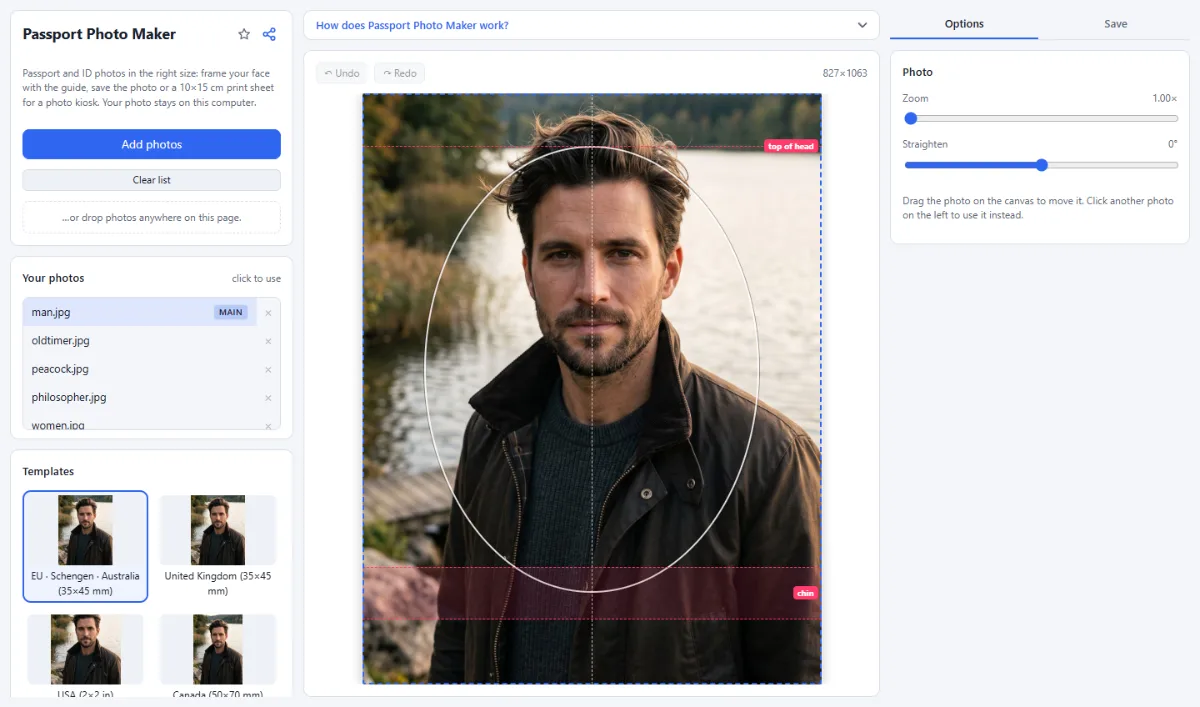
The Passport Photo Maker turns a photo you take at home into a passport or ID photo in the right size: 35×45 mm for the EU, the UK and Australia, 2×2 inches for the USA, 50×70 mm for Canada and 33×48 mm for a China visa.
A guide shows where the top of the head and the chin belong. Save the photo for online applications, or a 10×15 cm print sheet with several copies that photo kiosks and drugstores print for a few cents. Your photo is never uploaded. Rules differ and change: check them with the office that issues the document.
- Document sizes: EU · Schengen · Australia (35×45 mm), United Kingdom (35×45 mm), USA (2×2 in), Canada (50×70 mm) and China visa (33×48 mm), at 600 dpi.
- Head guide: A line for the top of the head, a band for the chin and an oval for the face: drag and zoom the photo until the head fits.
- Print sheet: "Save print sheet (10×15 cm)" puts as many copies as fit onto a 10×15 cm photo (for example 8 EU photos or 6 US photos), with thin cut lines.
- Private: Passport photos are personal data: the photo is processed in your browser and never leaves your computer.
How To Use The App
- Take the photo: Stand in front of a plain, light wall and look straight into the camera with a neutral face, without shadows or reflections on glasses (the USA does not allow glasses at all). Hold the camera at eye level, about 1.5 m away.
- Open it: Click "Open photos" or drop the photo onto the page.
- Choose the document: Pick the document under "Templates" on the left, for example "EU · Schengen · Australia (35×45 mm)".
- Fit your head: Use "Zoom" in the "Options" tab and drag the photo: top of the head on the upper line, chin in the band, face in the middle.
- Save: Open the "Save" tab and click "Save image" for online applications, or "Save print sheet (10×15 cm)" to have it printed as a 10×15 cm photo and cut it out.
Tips
- The background must be plain and light: this tool does not replace it.
- Print the sheet at its real size (10×15 cm, no "fit to page" or borders).
- Some offices only accept photos from certified photographers or require a digital code; check before you print.
Frequently asked questions
- What if my country is not in the list?
- You can still use the app if your document has one of the preset sizes: 35×45 mm (presets for the EU, Schengen, Australia and the United Kingdom), 2×2 inches (USA), 50×70 mm (Canada) or 33×48 mm (China visa). Other sizes cannot be entered. The head height rules of your country may differ from the guide, so compare it with the requirements of your issuing office.
- How large must the head be in the photo?
- That depends on the document. The guide uses these head heights (chin to top of the head), and its chin band covers this range: 32 to 36 mm for the EU, Schengen and Australia, 29 to 34 mm for the United Kingdom, 25.4 to 34.9 mm (1 to 1 3/8 inches) for the USA, 31 to 36 mm for Canada and 28 to 33 mm for a China visa.
- Which pixel size does the digital passport photo have?
- It is saved at 600 dpi: 827×1063 pixels for 35×45 mm, 1200×1200 for 2×2 inches, 1181×1654 for 50×70 mm and 780×1134 for 33×48 mm, as JPG or PNG. The file also states 600 dpi, so printing it at actual size or placing it in a document gives exactly the size of the photo. If an online application asks for fewer pixels or a smaller file, reduce the photo with Resize Images or Compress Images, and check the requirements of the form first.
- How many photos fit on the print sheet?
- Eight for the EU and the UK, six for the USA, four for Canada and nine for a China visa. The sheet is a 10×15 cm (4×6 inch) image of 3600×2400 pixels at 600 dpi, saved as JPG with thin gray cut lines. Order it as a normal 10×15 cm photo print without borders and cut along the lines.
- Does the app check whether my photo will be accepted?
- No. It sets the size and shows where the head belongs, but it does not detect faces or check lighting, expression and background. It also does not retouch the photo or replace the background: the photo can only be zoomed, moved and straightened. Whether it is accepted is decided by the office that issues the document.
- Is my passport photo stored or sent anywhere?
- No. The photo is cropped in this browser tab and never uploaded, and it is gone when you close the tab. For your next visit the app remembers only the chosen document and the framing, not the photo. The finished files are saved as downloads by your browser.
Related tools
- Profile Picture Maker: Rings · Backgrounds · Badges
- Crop Images: Each photo its own crop
- Resize Images: By pixels, percent or long side
- Compress Images: Smaller files, same look