Sticker Maker
Stickers from your photos, words and emoji with the classic white border and a transparent background. Saved as 512×512 WebP under 100 KB for WhatsApp and Telegram.
Sticker Maker tutorial
Functionality
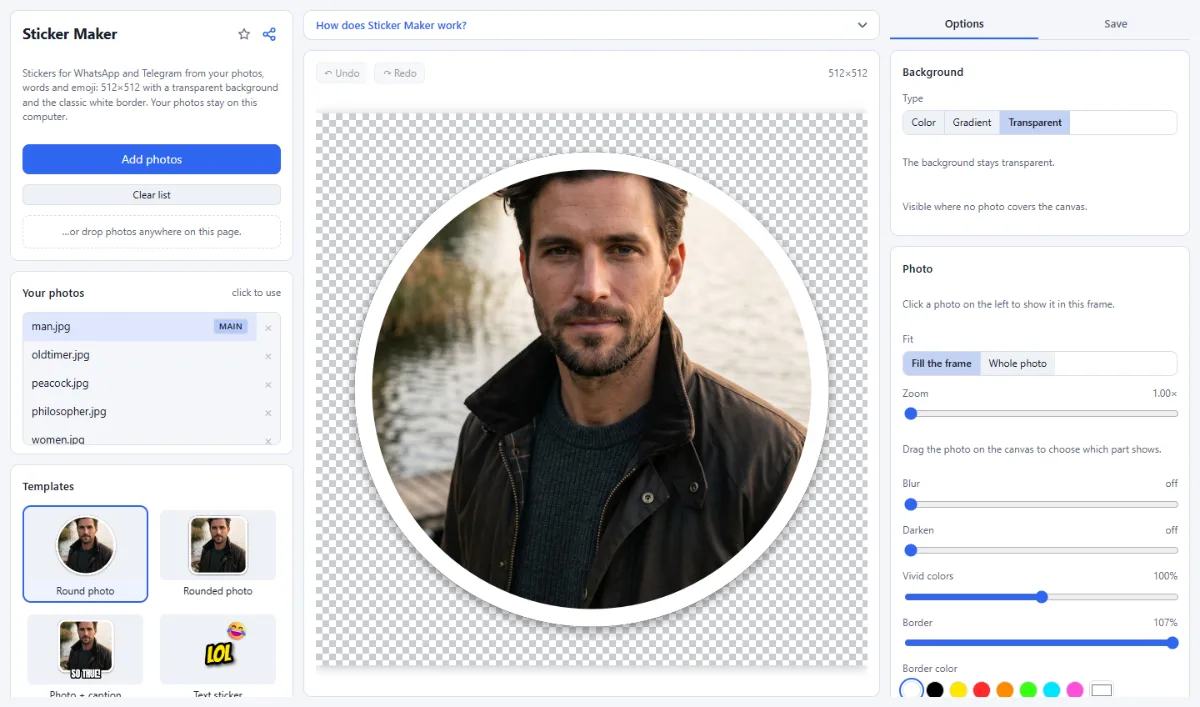
The Sticker Maker creates stickers for WhatsApp and Telegram: a photo with the classic white sticker border, a word in big bold letters, or an emoji with a short text.
Stickers are saved exactly as the apps want them: 512×512 pixels, transparent background, WebP under 100 KB. Your photos are never uploaded.
- Sticker styles: Round photo, Rounded photo, Photo + caption, Text sticker and Emoji + word, each shown with your photo.
- Transparent background: Everything outside the sticker is transparent; the checkerboard in the editor shows where.
- Ready for the chat apps: WebP at 512×512 and under 100 KB, the limit WhatsApp sets for stickers. PNG is available too, for example for Telegram.
- Text and emoji: Bold fonts with a white or black outline stay readable on light and dark chat backgrounds; emoji and shapes can be added.
How To Use The App
- Open a photo: Click "Open photos" or drop a photo onto the page; for a text or emoji sticker you do not need one.
- Pick a style: Choose a sticker style on the left.
- Frame and write: Drag the photo to choose what shows, click a text to change it, add emoji under "Add".
- Save: Open the "Save" tab and click "Save image": you get a 512×512 WebP file.
- Add it to your chat app: WhatsApp on the web and on desktop can create a sticker from an image file in the sticker panel; on phones, sticker apps import WebP files. In Telegram, send the file to the @Stickers bot.
Tips
- Short texts work best: one to three words.
- Use your own photos, or photos of people who agree: stickers get passed around.
- Safari cannot write WebP; there you get a PNG. Use another browser for WebP.
Frequently asked questions
- Does the Sticker Maker cut out the person or object from my photo?
- No. It does not remove backgrounds: the photo keeps its own background inside a round or rounded frame with a white border, and only the area outside the frame is transparent. Raise "Zoom" and drag the photo so that the face or object fills the frame.
- Can I make animated stickers?
- No. The Sticker Maker saves still images only, as WebP or PNG with 512×512 pixels. Animated stickers need an animated file, which this app does not create.
- How does the app keep stickers under 100 KB?
- When you save as WebP, it lowers the quality step by step until the file is below 100 KB, the limit WhatsApp sets for stickers. PNG is saved without that reduction, so a sticker with a detailed photo can be larger; the message after saving shows the file size, warns when it is over the limit and suggests WebP.
- Can I use an emoji that is not in the list?
- Yes. Add a text with "+ Text" or select one, then type or paste the emoji into the "Text" field, for example from the emoji keyboard of your system. Emoji are drawn with the emoji font of your device, so the saved sticker shows them as they look on it.
- Can I remove the white border or add a background color?
- Yes. Select the photo to change "Border" and "Border color" or to turn the border off; "Shadow" sets the soft shadow. With nothing selected, "Background" switches from "Transparent" to "Color" or "Gradient", for a sticker on a colored square.
- How do I make several stickers in the same style?
- Save the first sticker, then click the next photo under "Your photos": it replaces the photo in the frame, while texts and settings stay. Each file is named after its photo, for example beach-sticker.webp, so the files of a series are easy to tell apart.
Related tools
- Text & Meme Maker: Memes · Captions · Quotes
- Profile Picture Maker: Rings · Backgrounds · Badges
- Remove White Background: Transparent PNG in one click
- Photo Effects: Film · Vintage · Noir · Manga